
Semantic Release with Gitlab CI and To-Be-Continuous
Completely automate your Semantic Versioning workflow with Gitlab CI, semantic-release and to-be-continuous. No more human emotions in versioning, no more manual bumps, time gained, energy saved.


Introduction to Semantic Release
Let's say you are a software engineer, a platform engineer or simply an IT professional of any kind. You track changes on what you produce (web/mobile apps, dockerfiles, Kubernetes manifests, scripts, documentation, etc) through versioning platforms like Gitlab and work in a team or maybe solo.
You have adopted Semantic Versioning but are still thinking about the next version you are going to release every time and doing manual version bumps, which demands additional time and effort.
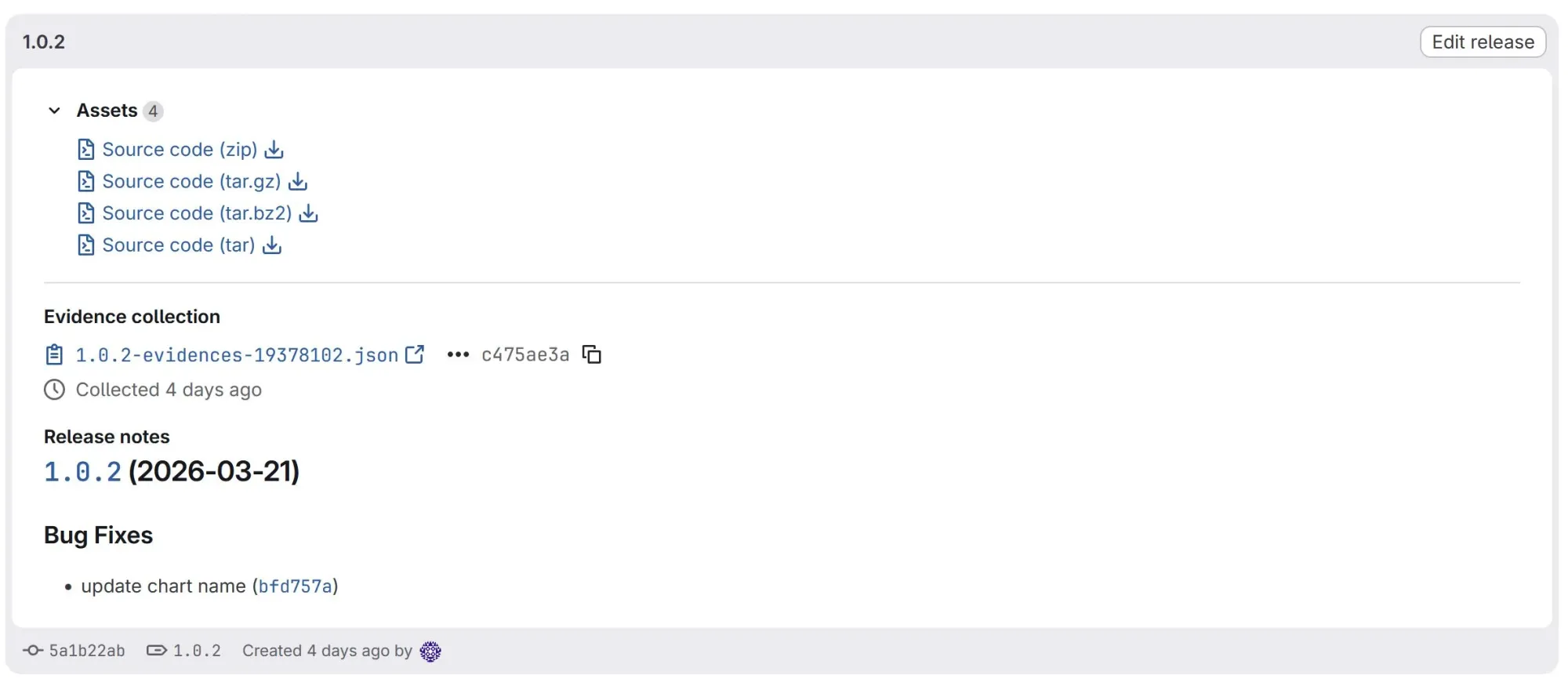
To solve that, say hello to semantic-release. Semantic-release will automatically determine your next release version number, eventually update version files inside your sources, create/update a changelog file containing the types of changes (bug fix, feature, breaking change) and the associated commits, create and publish releases with their associated release notes and assets.
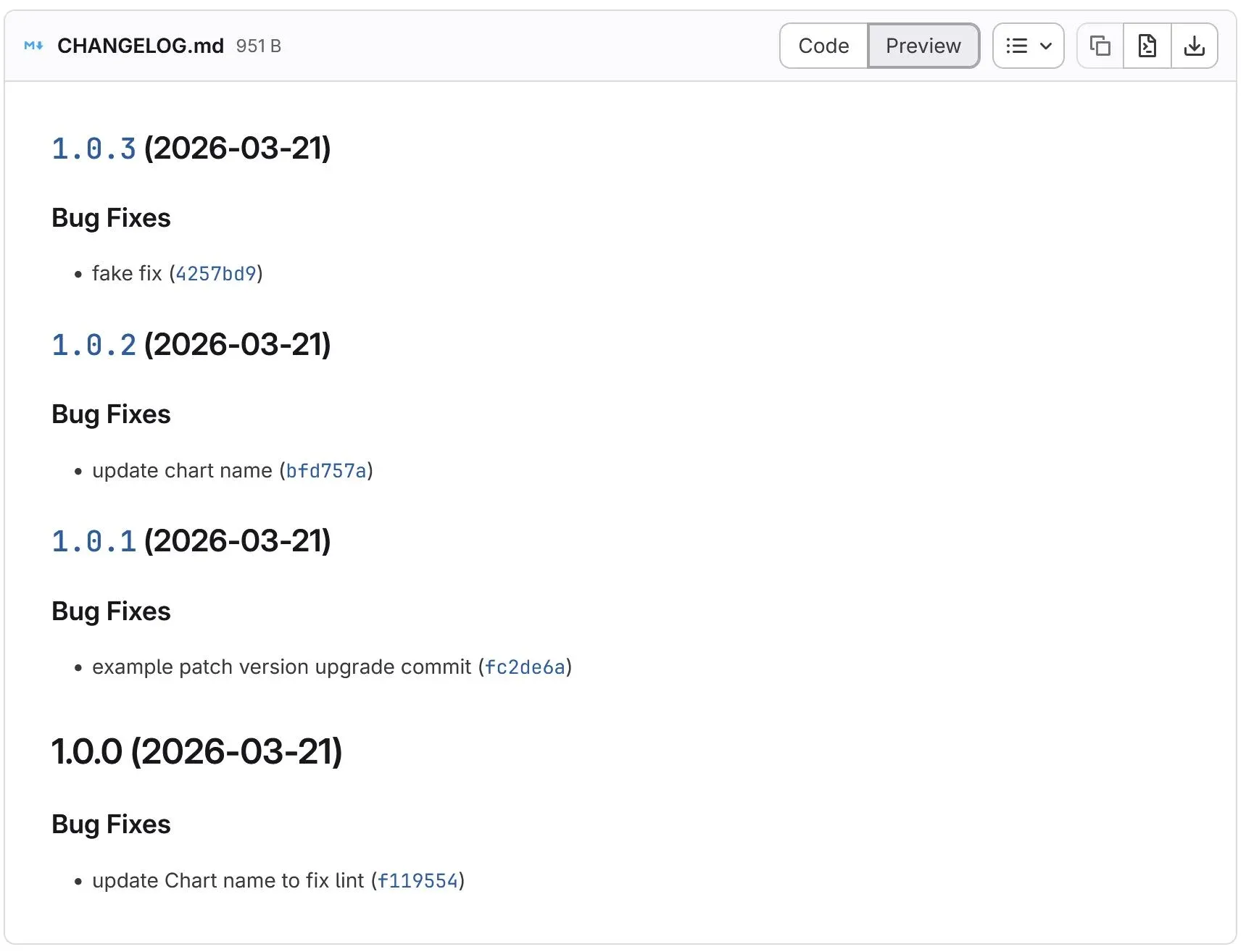
All of that is possible because semantic-release analyzes your commits. They should therefore be formatted in a specific way. The Angular Commit Message Conventions is used by default by semantic-release and is very similar to the Conventional Commit that you could also use.
Next, I will show you a way to easily implement semantic-release with Gitlab CI and the open source to-be-continuous project, which contains Gitlab CI templates and Components to ease pipelines creation.
The sample project
Let's say I am working on the packaging and distribution of Kubernetes manifests for my brand new open source application.
I use Helm to create the packages and Gitlab for versioning the sources and also as the OCI registry for distributing the packages.
I have created the Gitlab repository and the required Helm sources files to package and distribute the Kubernetes manifests. Here is the repository content at this step:
.
├── Chart.yaml
├── templates
│   ├── deployment.yaml
│   ├── _helpers.tpl
│   ├── hpa.yaml
│   ├── httproute.yaml
│   ├── ingress.yaml
│   ├── NOTES.txt
│   ├── serviceaccount.yaml
│   ├── service.yaml
│   └── tests
│       └── test-connection.yaml
└── values.yaml
We are going to implement semantic release on that project.
Gitlab CI configuration
Now I want to use Gitlab CI (Continuous Integration) feature to implement semantic-release and also lint, package and publish my Helm Chart automatically when I make changes to the repository. For that, I need to create a '.gitlab-ci.yml' configuration file with the following content:
include:
  - component: $CI_SERVER_FQDN/to-be-continuous/semantic-release/gitlab-ci-semrel@4.1
    inputs:
      # Make semantic-release job runs automatically, manual by default
      auto-release-enabled: true

  - component: $CI_SERVER_FQDN/to-be-continuous/helm/gitlab-ci-helm@9.4
    inputs:
      # Do not add any Helm repos
      repos: ""
      # Enable Charts linting
      lint-disabled: false
      # Run the helm-publish job only on tags pipelines
      publish-on: tag

# Make the helm-package job runs only on tags pipelines
helm-package:
  rules:
    - if: $CI_COMMIT_TAG

# Make the helm-lint job runs only on default
# branches and Merge Requests pipelines
helm-lint:
  rules:
    - if: $CI_MERGE_REQUEST_IID
    - if: $CI_COMMIT_BRANCH == $CI_DEFAULT_BRANCH
We use two Gitlab CI components from the open source to-be-continuous project:
- gitlab-ci-semrel - to implement semantic-release
- gitlab-ci-helm - to lint, package and publish the Helm Chart
If your merge requests commits are not forwarded after merge, you can enable Fast Forward setting for Merge Requests in Gitlab (Settings -> Merge requests -> Commits Fast Foward settings). This will add the commit history from your Merge Request into the target branch after merge, instead of creating a new global 'Merge Branch ... into main' commit. That way, semantic-release will have access the your conventional commits after the merge and will be able to update versions according to your configuration.
Semantic release configuration
I also use a '.releaserc.yml' configuration file that will be used by the semantic-release component (gitlab-ci-semrel), to configure semantic-release. Here is the content of that file:
# Run the semantic-release job only on these branches
branches:
  - main
  - master

plugins:
  # Analyzes commit messages to determine the next version number.
  # https://github.com/semantic-release/commit-analyzer
  - '@semantic-release/commit-analyzer'

  # Generates release notes from commit messages.
  # https://github.com/semantic-release/release-notes-generator
  - '@semantic-release/release-notes-generator'

  # Creates or updates a changelog file.
  # https://github.com/semantic-release/changelog
  - '@semantic-release/changelog'

  # Executes a shell command to update the Helm chart version.
  # This requires `yq` to be installed in the CI environment.
  # The to-be-continuous/semantic-release component we are using includes it.
  # https://github.com/semantic-release/exec
  - - '@semantic-release/exec'
    - prepareCmd: 'yq e ''.version = "${nextRelease.version}"'' -i Chart.yaml && yq e ''.appVersion = "${nextRelease.version}"'' -i Chart.yaml'

  # Commits release assets to the Git repository.
  # https://github.com/semantic-release/git
  - - '@semantic-release/git'
    - assets:
        - CHANGELOG.md
        - Chart.yaml
      message: "chore(release): ${nextRelease.version} [skip ci on prod]\n\n${nextRelease.notes}"

  # Publishes a GitLab release.
  # https://github.com/semantic-release/gitlab
  - '@semantic-release/gitlab'

# Set the Git tags format to 1.0.0 instead of v1.0.0
tagFormat: "${version}"
The semantic-release job from the gitlab-ci-semrel component will search for a .releaserc.{json,yaml,etc} inside the repository. If found, that configuration file is used.
Otherwise, the configuration will be generated on the fly by the semantic-release job using the configuration parameters available as inputs of the gitlab-ci-semrel component.
Here are other useful links that can be helpful for configuring semantic-release behavior through the '.releaserc' configuration file:
-
Example Git plugin page - where you will find info about parameters (assets and message for instance) used to customizing the Git plugin (@semantic-release/git) behavior
Granting repository write permissions to semantic-release
Now, one last thing... We should grant the semantic-release job, the permissions to read, create, and update files inside the Gitlab repository. The job should also be able to commit and create tags inside the repository. For that, we need to make an access token available to the job by setting the 'GITLAB_TOKEN' as an environment variable.
Here are three ways you can use to generate a value for that 'GITLAB_TOKEN' variable:
-
Gitlab project access token - scoped to a specific project
-
Gitlab group access token - scoped to a group to grant access to all the projects of that group
-
Gitlab personal access token - attached to a user rather than a group or project
Here are the permissions you should grant to the access token:
api- grants read and write access to the APIread_repository- grants read access to the repositorywrite_repository- grants write access to the repository
Once the access token generated with the required permissions, add the 'GITLAB_TOKEN' variable as a Gitlab CI/CD variable in 'Settings -> CI/CD -> Variables'.
The benefits of that configuration
Now let me explain the benefits of that configuration to my Helm Chart packaging and distribution workflow.
I don't have to think anymore about which version to set for the Chart after a specific change. The process of updating the Chart version and releasing that new version as an OCI artifact is fully automated.
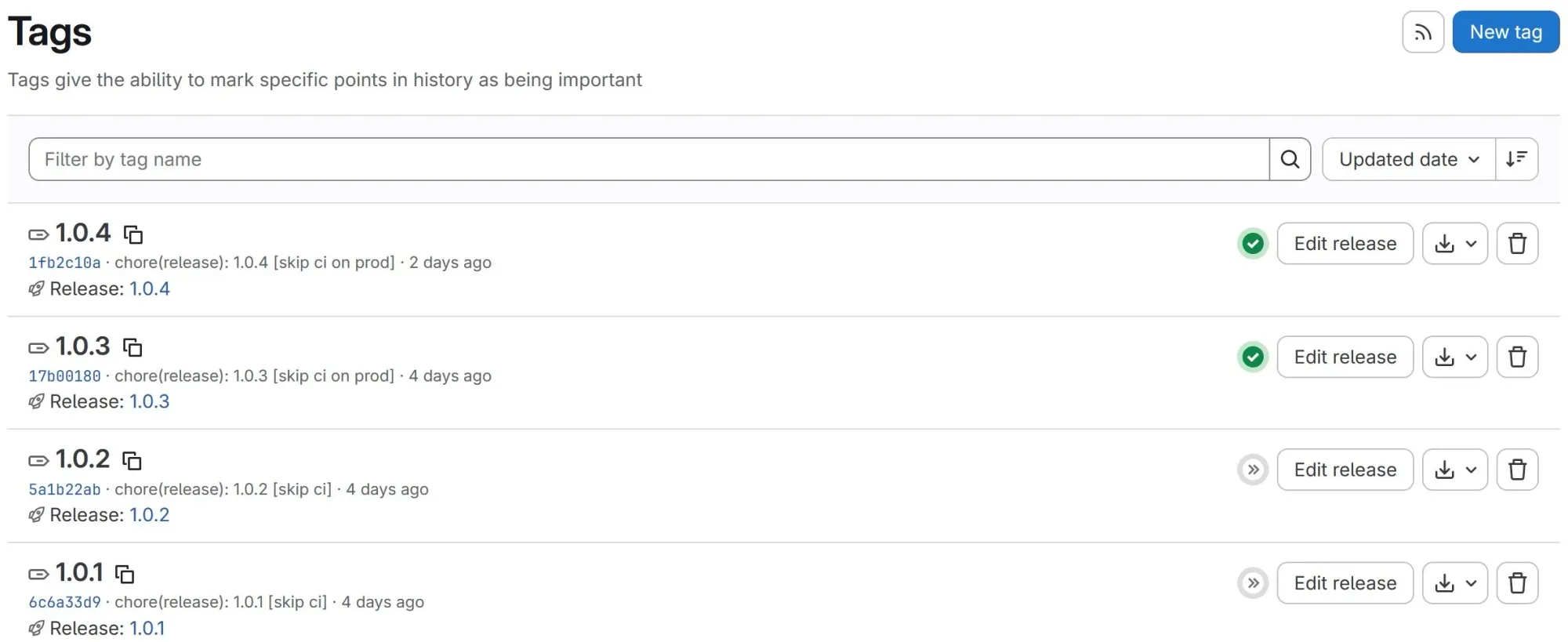
In cases where a version update is required, the semantic-release job will update the required version files inside the repository and create associated Git tags and releases named with that new version.
If there is not Git tags inside the repository, the first version number that will be created by semantic-release is 1.0.0. If there are already existing tags, the latest existing tag version number is the one that will be incremented.
Here are example tags and associated Gitlab releases created by the semantic-release job:
And an overview of the content of a release:
The only effort I have to make now is to properly set my commit messages depending on the type of change I make (semantic versioning major, minor or patch) inside the repository. I should prefix my commit messages with:
-
fix:- for fixes (bugs, security, etc): the current behavior of the Chart is not modified. This will make semantic-release increment the 'patch' version of the Chart. -
feat:- when adding new features: the current behavior of the Chart is modified. This will make semantic-release increment the 'minor' version of the Chart. Adding an exclamation point (e.g 'feat!') or creating a commit which footer includes 'BREAKING CHANGE' will make semantic-release increment the 'major' version of the Chart. -
chore:, doc:, ci:- for changes that should not trigger a version update. This will make 'semanctic-release' avoid updating version.
This commit convention is called Conventional Commits.
Final Workflow
Here is an overview of the complete Chart packaging and distribution workflow.
1 - I make changes to repository inside a new branch. I ensure my commits follow the Conventional Commits.
2 - I create a Merge Request to merge the changes into the 'main' branch. A Gitlab CI pipeline runs the 'helm-lint' job. The Merge Request is reviewed.
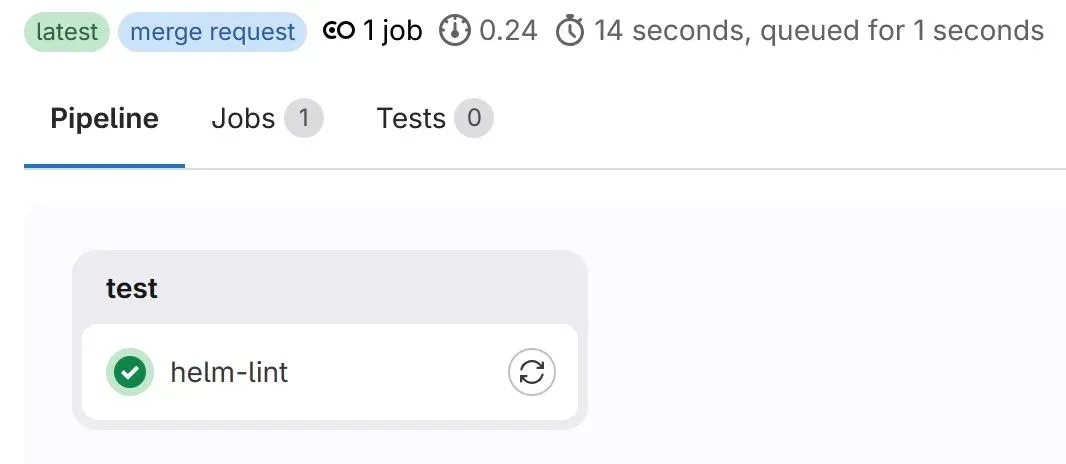
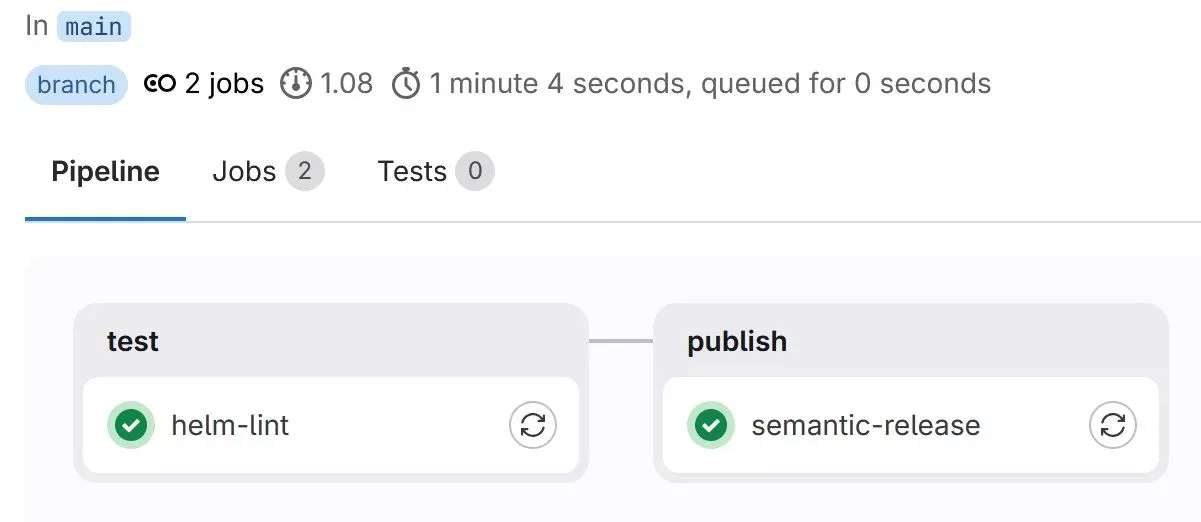
3 - Once the Merge Request approved, I merge. A Gitlab CI pipeline runs the 'helm-lint' job followed by the 'semantic-release' job on the 'main' branch.
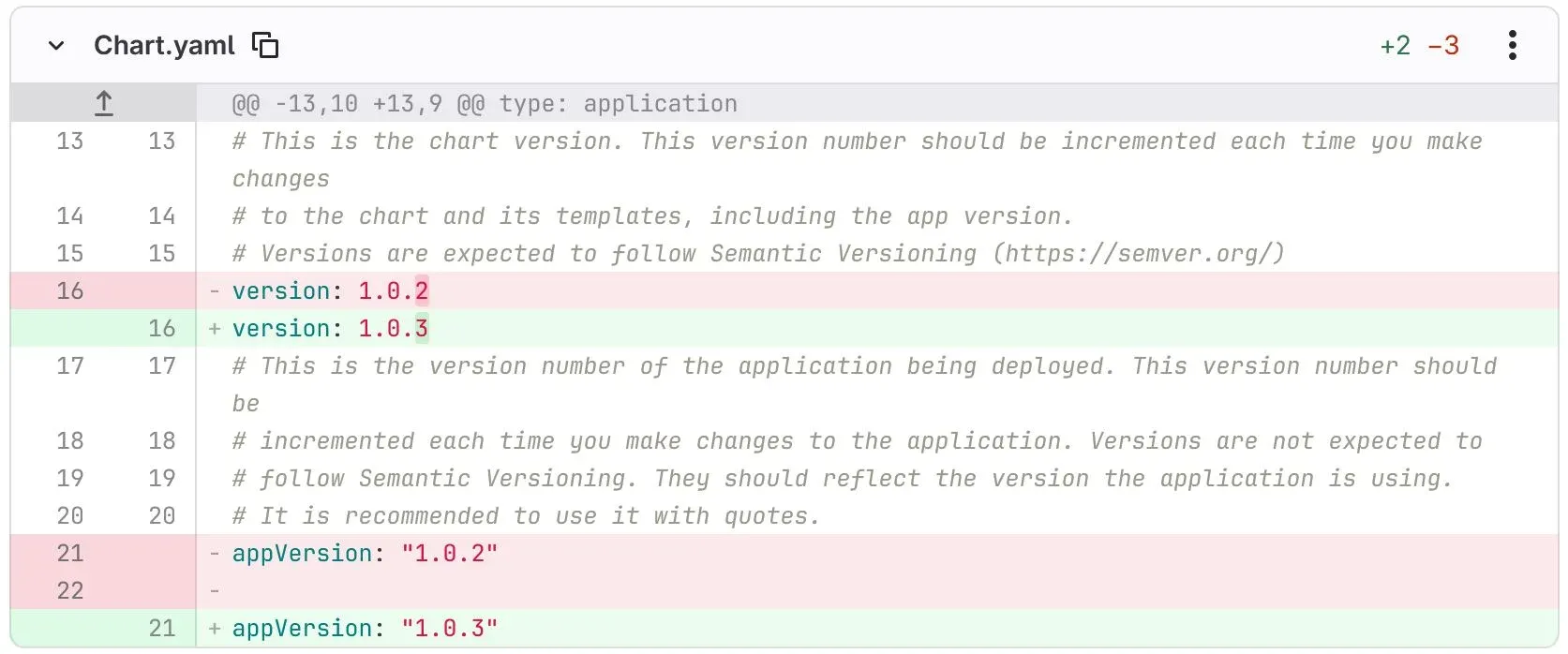
The 'semantic-release' job analyzes the commits and update the Chart semantic versions inside the 'Chart.yaml' file accordingly:
-
a 'patch' version update is performed if it detects commits starting with 'fix' only
-
a 'minor' version update is performed if it detects at least one commit starting with 'feat' and no commits starting with 'feat!' or containing a footer with 'BREAKING CHANGE'
-
a 'major' version update is performed if it detects at least one commit starting with 'feat!' or containing a footer with 'BREAKING CHANGE'
4 - The semantic-release job creates or updates a 'CHANGELOG.md' file containing the types of changes (Bug fixes, etc) and links to the related commits.
5 - The semantic-release job creates a new commit inside the main branch, containing its changes on 'CHANGELOG.md' and 'Chart.yml'. That commit body contains a release note that is added inside the commit message body.
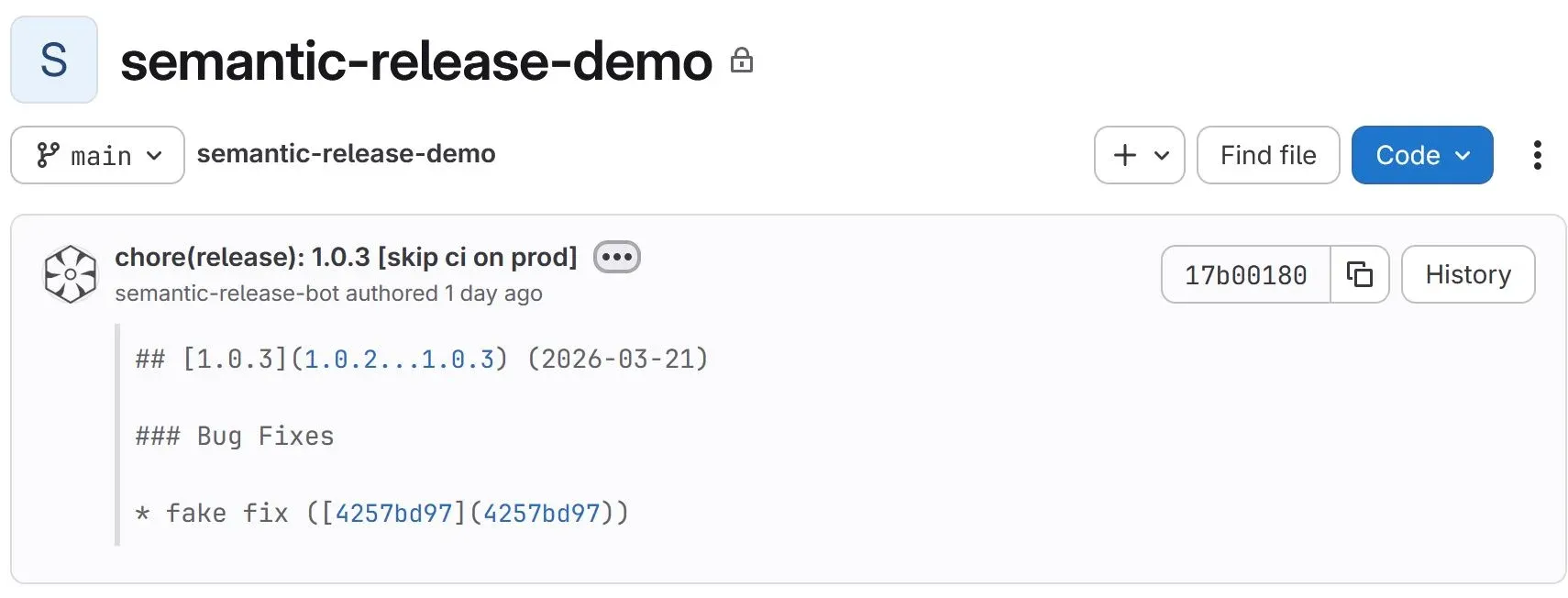
The commit message title includes '[skip ci on prod]' to ensure that the commit created by the semantic-release job inside the main branch doesn't create a new Gitlab CI branch pipeline but only creates a pipeline after a tag is created.
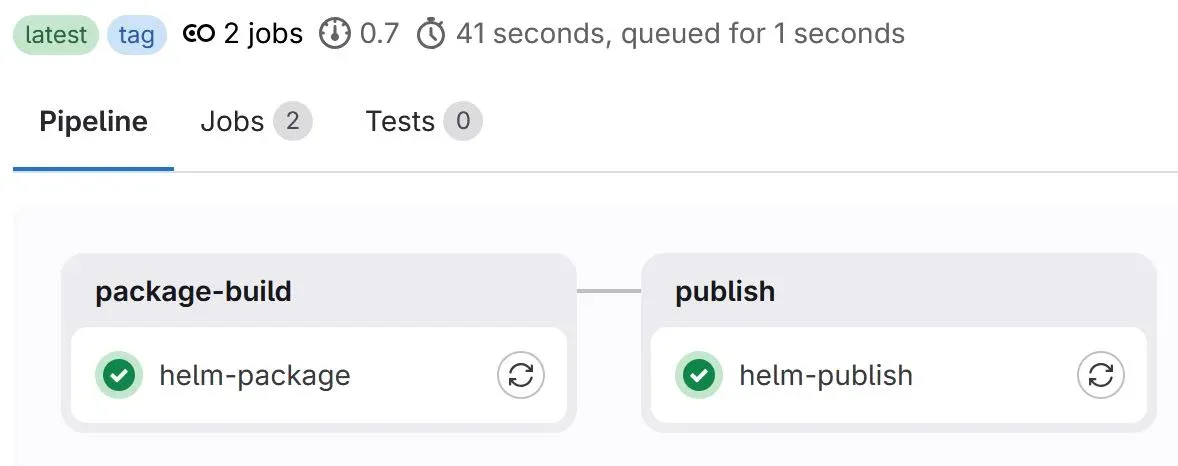
6 - The semantic-release job creates a tag named with the new version number, only when a patch, minor or major update is performed. That tag creation makes a Gitlab CI pipeline runs the 'helm-package' job followed by the 'helm-publish' job that releases the Helm Charts artefacts into Gitlab's OCI registry.
Here is a sample output of the semantic-release job logs in which a 'patch' version update has been performed from version 1.0.3 to 1.0.4:
[semantic-release] › ℹ  Running semantic-release version 25.0.3
[semantic-release] › ✔  Loaded plugin "verifyConditions" from "@semantic-release/changelog"
[semantic-release] › ✔  Loaded plugin "verifyConditions" from "@semantic-release/exec"
[semantic-release] › ✔  Loaded plugin "verifyConditions" from "@semantic-release/git"
[semantic-release] › ✔  Loaded plugin "verifyConditions" from "@semantic-release/gitlab"
[semantic-release] › ✔  Loaded plugin "analyzeCommits" from "@semantic-release/commit-analyzer"
[semantic-release] › ✔  Loaded plugin "analyzeCommits" from "@semantic-release/exec"
[semantic-release] › ✔  Loaded plugin "verifyRelease" from "@semantic-release/exec"
[semantic-release] › ✔  Loaded plugin "generateNotes" from "@semantic-release/release-notes-generator"
[semantic-release] › ✔  Loaded plugin "generateNotes" from "@semantic-release/exec"
[semantic-release] › ✔  Loaded plugin "prepare" from "@semantic-release/changelog"
[semantic-release] › ✔  Loaded plugin "prepare" from "@semantic-release/exec"
[semantic-release] › ✔  Loaded plugin "prepare" from "@semantic-release/git"
[semantic-release] › ✔  Loaded plugin "publish" from "@semantic-release/exec"
[semantic-release] › ✔  Loaded plugin "publish" from "@semantic-release/gitlab"
[semantic-release] › ✔  Loaded plugin "addChannel" from "@semantic-release/exec"
[semantic-release] › ✔  Loaded plugin "success" from "@semantic-release/exec"
[semantic-release] › ✔  Loaded plugin "success" from "@semantic-release/gitlab"
[semantic-release] › ✔  Loaded plugin "fail" from "@semantic-release/exec"
[semantic-release] › ✔  Loaded plugin "fail" from "@semantic-release/gitlab"
[semantic-release] › ✔  Run automated release from branch main on repository https://gitlab-ci-token:[secure]@gitlab.com/hackerstack/semantic-release-demo.git
[semantic-release] › ✔  Allowed to push to the Git repository
[semantic-release] › ℹ  Start step "verifyConditions" of plugin "@semantic-release/changelog"
[semantic-release] › ✔  Completed step "verifyConditions" of plugin "@semantic-release/changelog"
[semantic-release] › ℹ  Start step "verifyConditions" of plugin "@semantic-release/exec"
[semantic-release] › ✔  Completed step "verifyConditions" of plugin "@semantic-release/exec"
[semantic-release] › ℹ  Start step "verifyConditions" of plugin "@semantic-release/git"
[semantic-release] › ✔  Completed step "verifyConditions" of plugin "@semantic-release/git"
[semantic-release] › ℹ  Start step "verifyConditions" of plugin "@semantic-release/gitlab"
[semantic-release] [@semantic-release/gitlab] › ℹ  Verify GitLab authentication (https://gitlab.com/api/v4)
[semantic-release] › ✔  Completed step "verifyConditions" of plugin "@semantic-release/gitlab"
[semantic-release] › ℹ  Found git tag 1.0.3 associated with version 1.0.3 on branch main
[semantic-release] › ℹ  Found 1 commits since last release
[semantic-release] › ℹ  Start step "analyzeCommits" of plugin "@semantic-release/commit-analyzer"
[semantic-release] [@semantic-release/commit-analyzer] › ℹ  Analyzing commit: fix: testing
[semantic-release] [@semantic-release/commit-analyzer] › ℹ  The release type for the commit is patch
[semantic-release] [@semantic-release/commit-analyzer] › ℹ  Analysis of 1 commits complete: patch release
[semantic-release] › ✔  Completed step "analyzeCommits" of plugin "@semantic-release/commit-analyzer"
[semantic-release] › ℹ  Start step "analyzeCommits" of plugin "@semantic-release/exec"
[semantic-release] › ✔  Completed step "analyzeCommits" of plugin "@semantic-release/exec"
[semantic-release] › ℹ  The next release version is 1.0.4
[semantic-release] › ℹ  Start step "verifyRelease" of plugin "@semantic-release/exec"
[semantic-release] › ✔  Completed step "verifyRelease" of plugin "@semantic-release/exec"
[semantic-release] › ℹ  Start step "generateNotes" of plugin "@semantic-release/release-notes-generator"
[semantic-release] › ✔  Completed step "generateNotes" of plugin "@semantic-release/release-notes-generator"
[semantic-release] › ℹ  Start step "generateNotes" of plugin "@semantic-release/exec"
[semantic-release] › ✔  Completed step "generateNotes" of plugin "@semantic-release/exec"
[semantic-release] › ℹ  Start step "prepare" of plugin "@semantic-release/changelog"
[semantic-release] [@semantic-release/changelog] › ℹ  Update /builds/hackerstack/semantic-release-demo/CHANGELOG.md
[semantic-release] › ✔  Completed step "prepare" of plugin "@semantic-release/changelog"
[semantic-release] › ℹ  Start step "prepare" of plugin "@semantic-release/exec"
[semantic-release] [@semantic-release/exec] › ℹ  Call script yq e '.version = "1.0.4"' -i Chart.yaml && yq e '.appVersion = "1.0.4"' -i Chart.yaml
[semantic-release] › ✔  Completed step "prepare" of plugin "@semantic-release/exec"
[semantic-release] › ℹ  Start step "prepare" of plugin "@semantic-release/git"
[semantic-release] [@semantic-release/git] › ℹ  Found 2 file(s) to commit
[semantic-release] [@semantic-release/git] › ℹ  Prepared Git release: 1.0.4
[semantic-release] › ✔  Completed step "prepare" of plugin "@semantic-release/git"
[semantic-release] › ℹ  Start step "generateNotes" of plugin "@semantic-release/release-notes-generator"
[semantic-release] › ✔  Completed step "generateNotes" of plugin "@semantic-release/release-notes-generator"
[semantic-release] › ℹ  Start step "generateNotes" of plugin "@semantic-release/exec"
[semantic-release] › ✔  Completed step "generateNotes" of plugin "@semantic-release/exec"
[semantic-release] › ✔  Created tag 1.0.4
[semantic-release] › ℹ  Start step "publish" of plugin "@semantic-release/exec"
[semantic-release] › ✔  Completed step "publish" of plugin "@semantic-release/exec"
[semantic-release] › ℹ  Start step "publish" of plugin "@semantic-release/gitlab"
[semantic-release] [@semantic-release/gitlab] › ℹ  Published GitLab release: 1.0.4
[semantic-release] › ✔  Completed step "publish" of plugin "@semantic-release/gitlab"
[semantic-release] › ℹ  Start step "success" of plugin "@semantic-release/exec"
[semantic-release] › ✔  Completed step "success" of plugin "@semantic-release/exec"
[semantic-release] › ℹ  Start step "success" of plugin "@semantic-release/gitlab"
[semantic-release] › ✔  Completed step "success" of plugin "@semantic-release/gitlab"
[semantic-release] › ✔  Published release 1.0.4 on default channel
With this in place, I just can focus on my developments. No more human emotions related to versions number, no more manual bumps... time gained, energy saved... version bumps, releases, changelogs are automated, consistent and reflect the actual changes.
Thanks for reading, keep learning and see you in the next post 🚀